Open web. Clear feed.

Simple, free, fully responsive one-page sites for pretty much anything.
🎉 IT'S ON: CARRD BLACK FRIDAY SALE 🎉 40% OFF ALL PRO PLANS Build responsive one-page sites for pretty much anything—at our lowest price of the year. ✅ Upgrade: Basic → Pro Lite → Pro Standard → Pro Plus ✅ Renew: Stack extra years onto your current plan at 40% off (even if your plan is not expiring) ✅ Gift: Send someone a Pro plan via Account → Library → Buy Items Use code BF2026 at checkout. (Or go to try.carrd.com/bf2026)
Little quality of life updates we recently added to Carrd that you probably won't notice: ✉️ Enabling Prefill Reply-To address on "Send Email" forms will now attempt to prefill the "name" portion of the header as well 🏷️ Custom meta tags can now be used to override the default meta tags og:description, og:site_name, og:title, og:type, and viewport 📂 Added file URL support for site files (eg. file:vcard.vcf)

💬 Review Widget Builder Build a custom review widget in minutes — then copy the code and use it anywhere. ✓ Slider or grid layout ✓ Light or dark theme ✓ Fully customizable ✓ No account ✓ No tracking ✓ No dependencies ✓ No monthly fees Your reviews are embedded directly in the code — one self-contained block of HTML, CSS + JavaScript. Works with Carrd, Framer, Webflow, WordPress, or any HTML website. Build it once. Keep it forever. carrdtemplates.com/review-wi… #ReviewWidget #Testimonials #SocialProof #Carrd

See the demo for Template #325 here: carrd.com/dashboard/build/de…
👀 Show the difference. carrdtemplates.com/before-af… Our free Before/After Builder turns two images you’ve uploaded to Carrd into an interactive slider. Visitors drag to compare before and after for themselves. Customize the look, copy the code, and add it to an Embed — no separate image hosting needed. #Carrd #WebDesign #Marketing


NEW plugin: Webp images Saw many questions about using .webp images in Carrd, so made a plugin! Now you can use .webp / .avif, or images hosted in image delivery/CDN platforms like Imagekit, Cloudinary or AWS. FREE to download. Requires Pro Plus. Link ↓
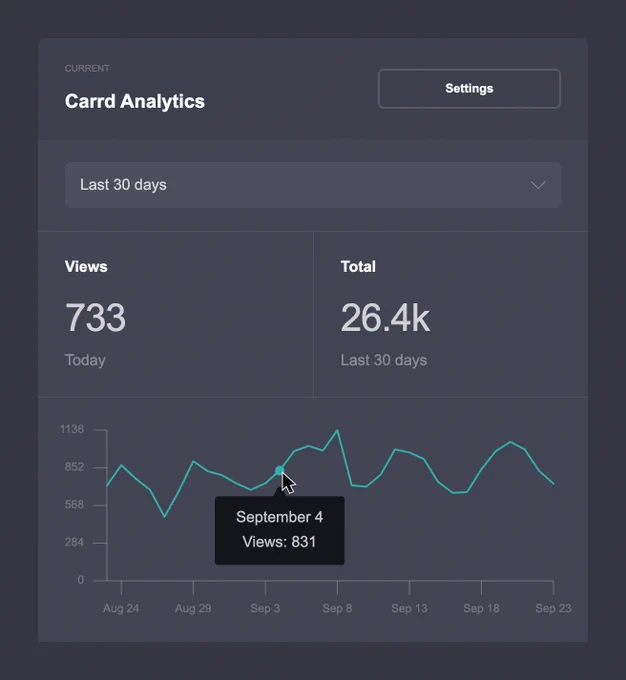
How tracking works Because Carrd Analytics is entirely native to the Carrd platform, it does not use cookies, client-side browser storage mechanisms, or external scripts and libraries to track views. When enabled on a site, Carrd Analytics processes a limited amount of that site's visitor data to help prevent duplicate views from being tracked, then automatically deletes that data after a short period of time. Only aggregate view counts are actually retained for the long term (and even then, only for the purpose of reporting). When Carrd Analytics is disabled on a site, those aggregate view counts are also deleted. carrd.com/docs/sites/using-c…

AI-powered FAQ section in Carrd powered by chatbase. Normal FAQs only answer what you thought of. This one lets visitors ask their own.

We've hunted down the best @Carrd template makers for you. starrt.co/blog/complete-list…

Build your pricing section in just a few minutes ⚡ Create up to 4 responsive cards, match your site’s style, and paste the code into Carrd or any website. carrdtemplates.com/tools Free. No account. No subscription. #Carrd #NoCode

New mini-feature: The copy: shortcut in the URL field (eg copy:caycepollard) of a Button element immediately copies the text to your computer's clipboard without any confirmation alert popup (This is in contrast to the older clipboard: shortcut which shows a "click to copy" confirmation alert popup)