
 Open web. Clear feed.

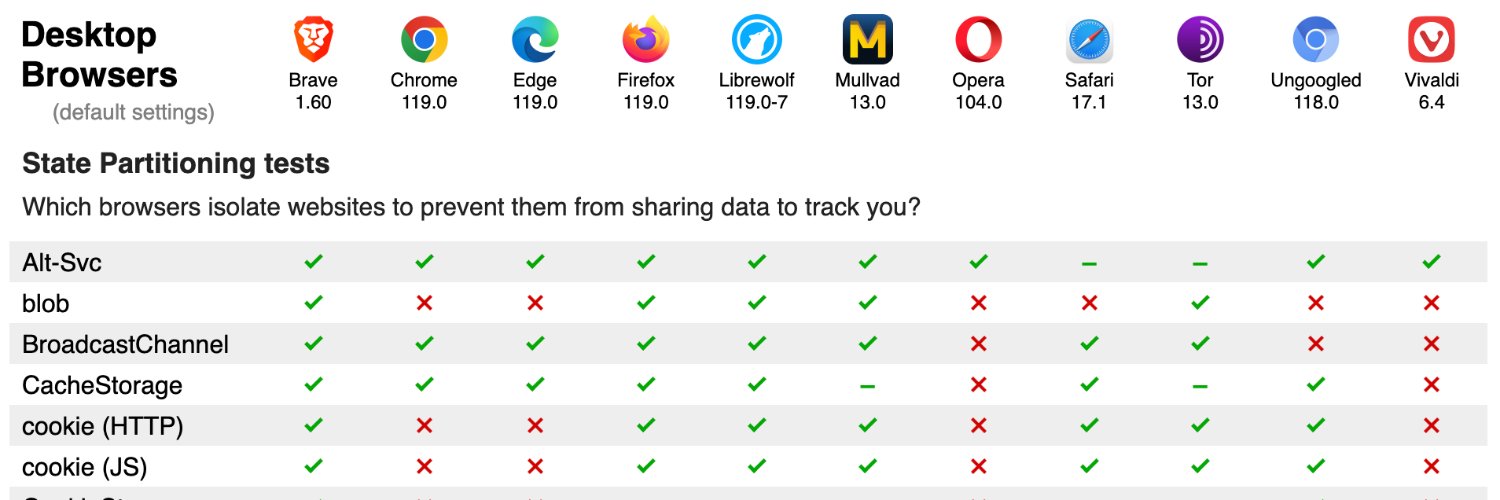
Open-source tests of web browser privacy. Developed and maintained by @arthuredelstein. Follow @privacytests for the latest browser test results!

there’s still a lot of work to do.
New Fingerprinting Tests! I'm excited to announce a major addition to PrivacyTests.org: we have developed two dozen new fingerprinting resistance tests to obtain an objective head-to-head comparison of how different browsers protect you against fingerprinting. Our results show that no browser has perfect fingerprinting defenses. The strongest protections are seen in LibreWolf, Mullvad Browser, and Tor Browser, but every browser has room for improvement! Fingerprinting is a common method that online trackers use to uniquely identify your computer and track you invisibly as you browse the web. Browsers can protect you against fingerprinting, but the current level of protection varies greatly between browsers. Our fingerprinting resistance tests, currently run on desktop browsers, are organized in two sections: Device tests and Settings tests. The "Device" tests measure whether your browser is leaking detailed information about your computer hardware. Fingerprintable properties of your computer that we measure include audio processing, GPU, memory, CPU cores, math processing, chip architecture, and OS version. The "Settings" tests measure whether system settings are leaking through your browser. Fingerprintable settings that we measure include screen resolution, system toolbar dimensions, display preferences, keyboard layout, timezone location, and user-installed fonts. Traditionally, services such as CoverYourTracks.eff.org, fingerprint.com, and amiunique.org survey a population of browser visitors and analyze the uniqueness of your browser's fingerprint. PrivacyTests.org's fingerprinting tests take a different, complementary approach across browsers. These tests directly measure whether each browser is leaking characteristics of the computer it is running on. For example, to check if the number of CPU cores is leaked, our test runs the same browser on virtual machines with different numbers of CPU cores and asks: does the browser spoof or randomize the value? If so, the browser passes the test (✅)! If, instead, it leaks the true value, then the browser has failed the test (❌)! We apply this approach to many system settings and device properties that are commonly used by tracking scripts to fingerprint your computer. The fingerprinting test results shown here are part of the larger context of browser privacy protections reflected in our many other categories of privacy test results, all presented at PrivacyTests.org. We hope these fingerprinting test results are useful to everyone looking to switch to a browser that respects and protects their privacy. We also hope they are galvanizing to any browser engineering team working to improve their browser's privacy. We'll keep testing over time! ✅❌


New Fingerprinting Tests! I'm excited to announce a major addition to PrivacyTests.org: we have developed two dozen new fingerprinting resistance tests to obtain an objective head-to-head comparison of how different browsers protect you against fingerprinting. Our results show that no browser has perfect fingerprinting defenses. The strongest protections are seen in LibreWolf, Mullvad Browser, and Tor Browser, but every browser has room for improvement! Fingerprinting is a common method that online trackers use to uniquely identify your computer and track you invisibly as you browse the web. Browsers can protect you against fingerprinting, but the current level of protection varies greatly between browsers. Our fingerprinting resistance tests, currently run on desktop browsers, are organized in two sections: Device tests and Settings tests. The "Device" tests measure whether your browser is leaking detailed information about your computer hardware. Fingerprintable properties of your computer that we measure include audio processing, GPU, memory, CPU cores, math processing, chip architecture, and OS version. The "Settings" tests measure whether system settings are leaking through your browser. Fingerprintable settings that we measure include screen resolution, system toolbar dimensions, display preferences, keyboard layout, timezone location, and user-installed fonts. Traditionally, services such as CoverYourTracks.eff.org, fingerprint.com, and amiunique.org survey a population of browser visitors and analyze the uniqueness of your browser's fingerprint. PrivacyTests.org's fingerprinting tests take a different, complementary approach across browsers. These tests directly measure whether each browser is leaking characteristics of the computer it is running on. For example, to check if the number of CPU cores is leaked, our test runs the same browser on virtual machines with different numbers of CPU cores and asks: does the browser spoof or randomize the value? If so, the browser passes the test (✅)! If, instead, it leaks the true value, then the browser has failed the test (❌)! We apply this approach to many system settings and device properties that are commonly used by tracking scripts to fingerprint your computer. The fingerprinting test results shown here are part of the larger context of browser privacy protections reflected in our many other categories of privacy test results, all presented at PrivacyTests.org. We hope these fingerprinting test results are useful to everyone looking to switch to a browser that respects and protects their privacy. We also hope they are galvanizing to any browser engineering team working to improve their browser's privacy. We'll keep testing over time! ✅❌

Still lots of room for improvement, but they're on the right track!


Chrome indeed provides state-of-the-art security, but privacy is another matter. See privacytests.org for more details.


Andrew from Chrome Security breaks down the massive scale behind how we protect the web and scan 11 billion sites every day.
All of these protections are already built into Firefox, but they are turned *off* by default. It's a choice not to enable these protections by default: there's no technical obstacle.
If this is the case, @Firefox, why don't you do more by default? Why don't you block most tracking content by default? Or block tracking query parameters? Or send the Global Privacy Control header? If you really want to protect your users, you need to do more. Privacy by default is the way.


While the internet got worse. Firefox got better. We're built to protect, not track you, with AI on your terms, and ad blocker support. It’s time to come back to Firefox. mzl.la/welcomebackX 3/3

NEW @citizenlab report We uncovered an Israeli firm using online ads to run vast spy operation This is the first-ever public confirmation of zero-click mercenary spyware delivered via targeted ads. 45 devices at @AJEnglish confirmed infected citizenlab.ca/research/how-d…


