We make cutting-edge tools for teachers including wireless teaching stations, doc cameras, digital podiums, interactive panels & software to tie it all together
What happens when you give a document camera AI superpowers? ⚡🧠
Meet HoverCam Flex AI.
✨ Generate lessons, PDFs & quizzes
📝 Grade paper assignments
📐 Straighten documents
And much more.
Works with any USB doc cam.
hovercam.com/flex-ai#FlexAI#EdTech
We’re giving away up to 100 eGlass Lightboards. 🤯
Want one for your classroom?
🎥 Post a short video telling us how you’d use it
🏷️ Tag us @thehovercam@GeteGlass#eGlassClassroom
🔗 Submit it at eglass.io/giveaway
You just cover shipping.
Open to K–12 teachers in the contiguous U.S. Full details + terms at the link.
10 reasons your classroom needs the new Pilot 8 👇
🖥️ 27” touchscreen
📡 Wireless casting with DreamLink
↕️ Height adjustable
🔋 Device charging
🔒 Secure storage
...and more.
But #10 is the big one: Teach from anywhere in the classroom.
#EdTech#Pilot8
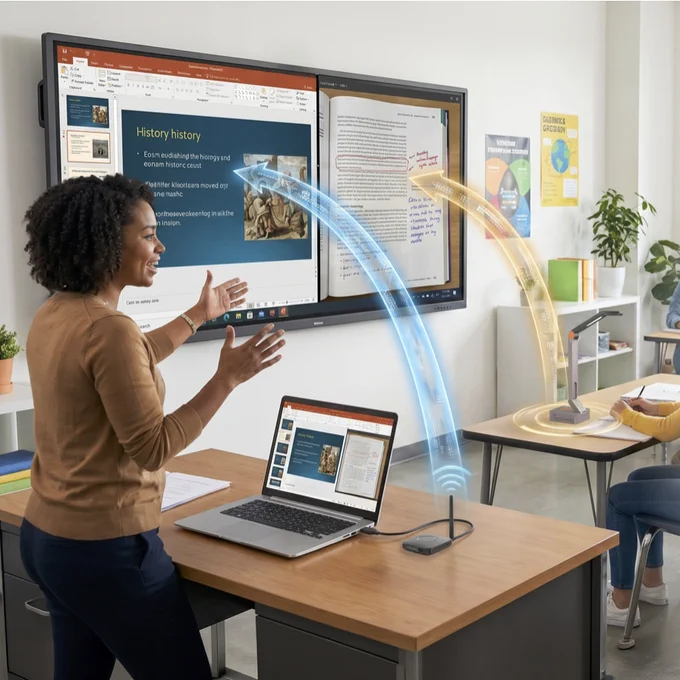
Show your laptop AND your doc cam. At the same time.
With Orbit Trio, teachers can wirelessly cast both to the classroom display simultaneously.
Keep your lesson on screen while showing a live demo, worksheet, book, experiment, or student work right beside it.
No switching inputs. No digging through menus. No drivers. No software. No Wi-Fi passwords. No school network.
#HoverCam#OrbitTrio#DocumentCamera#EdTech#ClassroomTechnology#TeachersOfInstagram
Orbit is the doc cam that just works for classrooms.
Wireless setup.
USB camera mode for your computer.
Wireless HDMI to your display or IFP.
Works with the camera app you already use.
No software or drivers required.
Simple for teachers. Flexible for every classroom.
A historic day for HoverCam.
We’re proud to announce THREE 2026 Best of InfoComm Award wins:
🏆 Best Meeting Room System — InstaCast
🏆 Best Solution for Higher Education — Pilot 8
🏆 Best Solution for K-12 — DreamLink
InstaCast and Pilot 8 made their official debut at #InfoComm2026.
Read more:
hovercam.com/blog/hovercam-w…
We’re excited to introduce Flex AI — the AI classroom assistant upgrade for Flex 11!
It brings practical AI to the HoverCam hardware schools already own, like rapid paper grading, voice commands, live translation, and more!
Click the link below for a sneak preview, and get a hands-on demo at ISTE '26!
hovercam.com/blog/the-ai-ass…
Did IT forget the rest of the instructions?
Nope.
Orbit Air setup:
1. Plug in the receiver
2. Turn it on
3. There is no step 3
No drivers.
No software installs.
No Wi-Fi passwords.
No setup drama.
Just wireless classroom teaching.
hovercam.com/orbit-air
Classroom casting should be simple.
No drivers.
No software installs.
No passwords.
No subscriptions.
No tethering teachers to the front of the room.
HoverCam DreamLink gives classrooms a plug-and-play way to cast, control interactive flat panels, connect with Orbit Air wireless document cameras, and keep teachers free to teach from anywhere.
Powered by HoverCam’s patent-allowed InvisiWire™ technology, DreamLink is built for teachers, IT teams, and districts that are ready for fewer setup headaches and more classroom freedom.
Most wireless document cameras still come with setup hassles, apps, drivers, pairing, and IT headaches.
HoverCam Orbit was built differently: no apps, no drivers, no passwords, no network setup — just plug-and-play wireless that works.
See the full comparison: hovercam.com/blog/25f13d20dt…#EdTech#WirelessDocumentCamera
🚀 Big news, educators! HoverCam’s Orbit wireless document cameras & DreamLink suite just received USPTO patent protection for InvisiWire™ technology!
Your favorite plug-and-play wireless tools are now backed by additional patents — even more secure, reliable, and simple.
The freedom you love in the classroom? Now officially protected. 🎉
#EdTech#HoverCam#ClassroomTech#WirelessLearning
“Plug and Play” is the biggest lie in tech.
Most products really mean: Plug → Install → Configure → Pray 😂
HoverCam Orbit & DreamLink Trio?
One step: Plug it in. Instant play.
No drivers. No apps. No Wi-Fi passwords. Works on ANY computer.
True Plug-and-Play isn’t marketing hype — it’s classroom reality.
Read why it matters: hovercam.com/blog/the-most-o…#EdTech#PlugAndPlay#WirelessDocCam#K12
Ever wondered why “Not on Your Network” actually matters for classroom tech? In schools, one breach in a wireless doc cam can spread fast to your entire district infrastructure.
Many solutions claim isolation but still install drivers or apps on networked computers—defeating the purpose.
HoverCam’s Orbit creates a true fire gap with an external dongle. No proprietary code on your network.
Read why it matters more than you think: hovercam.com/blog/why-not-on…#EdTech#SchoolSecurity#HoverCamOrbit
Raise your hand ✋ if a cable has ever pulled something off your desk mid-lesson.
Yeah. That's why we made the HoverCam Orbit wireless. #TeacherLife#EdTech#HoverCam
Most doc cams come with a chain. 🔗
It's called a USB cable — and it keeps teachers stuck at the front while students check out.
The HoverCam Orbit cuts it loose. Wireless. 4K. Simple setup. Works with your computer OR your IFP.
hovercam.com/blog/the-chain-…#EdTech#TeacherLife